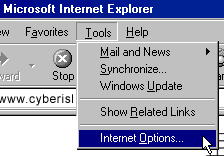
- From the Menu bar select Tools then click on Internet Options
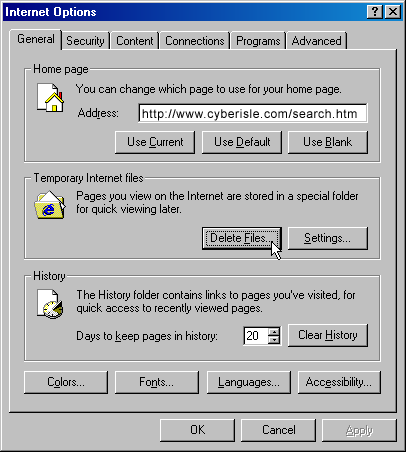
- On the General Tab select Delete Files from the Temporary Internet Files section
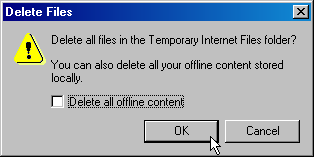
- When prompted select OK to clear your computers Memory Cache. Close all menus and you're done.
- Click the View menu, then click Internet Options. With Macintosh, click the Edit menu, then click Preferences.
- Click the General tab. With Macintosh, click Advanced in the right column.
- Click Delete Files under Temporary Internet Files. With Macintosh, Empty Now.
- Click OK.
To clear your cache with Netscape Communicator 4 Each profile
in Netscape Communicator has its own cache. If you are using profiles
to share the use of Communicator, you are not clearing the cache for the
other profiles
when you clear your own cache.
 with Macintosh ) next to Advanced.
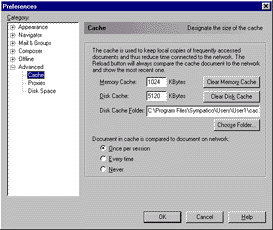
Netscape Communicator 4 for Windows 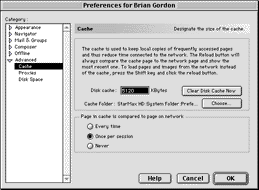
Netscape Communicator 4 for Macintosh
To clear your cache with Netscape Navigator 3
- Click the Options menu, then click Network Preferences.
- Click the Cache tab.
- With Windows, click Clear Memory Cache, then click OK. Click Clear Disk Cache, then click OK. With Macintosh, click Clear Disk Cache Now.
- Click OK to close the Preferences window.
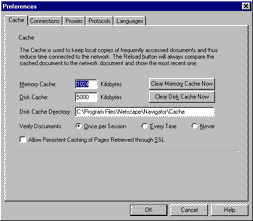
Netscape Navigator 3 for Windows
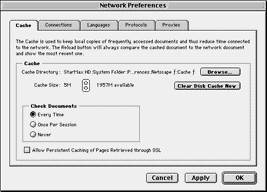
Netscape Navigator 3 for Macintosh
Clearing Cache on Microsoft® Internet Explorer 6.0
- Click Start and select Settings, then Control Panel.
- Double-click Internet Options to open Internet Properties.
- Click Delete Files.
- Click OK on the Delete Files dialog box.
- Click OK.
Clearing Cache on Microsoft® Internet Explorer 7.0
- Click Start and select Settings, then Control Panel.
- Double-click Internet Options.
- Click the General tab.
- Click Delete under the Browsing History section.
- Click Delete Files in the Delete Browsing History dialog box.
- Click Close.
- Click OK.
- Close and reopen your browser.
Clearing Cache on Microsoft® Internet Explorer 8.0
- Click Start and select Settings, then Control Panel.
- Double-click Internet Options.
- Click the General tab.
- Click Delete under the Browsing History section.
- Uncheck every check box except for Temporary Internet Files.
- Click Delete Files in the Delete Browsing History dialog box.
- Click Cancel.
- Click OK.
- Close and reopen your browser.
Clearing Cache on Firefox 1.0
- Click Tools and select Options.
- Click the Privacy Icon.
- Click Clear next to the Cache section.
- Click Ok.
- Close and reopen your browser.
Clearing Cache on Firefox 1.5
- Click Tools and select Options.
- Click the Privacy icon.
- Click the Cache tab and click Clear Cache Now.
- Click Ok.
- Close and reopen your browser.
Clearing Cache on Firefox 2.0
- Click Tools and select Options.
- Click the Advanced icon and click the Network tab.
- Click Clear Now under the Cache section.
- Click Ok.
- Close and reopen your browser.
Clearing Cache on Firefox 3.0
- Click Tools and select Options.
- Click the Privacy icon on the Options menu bar.
- Scroll down to the Private Data section.
- Click the Settings button to open the Clear Private Data window.
- Verify that the Cookies and Save Passwords boxes are not checked.
- Click OK to close the Clear Private Data window.
- Click Clear Private Data Now.
- Click OK to close the Options window.
- Close and reopen your browser.
Clearing Cache on Netscape® Navigator 9.X
- Click Tools and select Options.
- Click the Privacy.
- Click Clear Now under the Private Data section.
- Check the box Cache and Clear Private Data Now.
- Click OK.
- Close and reopen your browser.
Safari 3.0
- Click Edit and select Empty Cache.
- Click Empty.
- Close and reopen your browser.
AOL 7.0
- Close your browser.
- Click Start, select Settings and Control Panel.
- Double-click Internet Options.
- Click Delete Files.
- Click OK on the Delete Files dialog box.
- Click OK.
AOL 8.0
- Close your browser.
- Click Start, select Settings and Control Panel.
- Double-click Internet Options.
- Click Delete Files.
- Click OK on the Delete Files dialog box.
- Click OK.
AOL 9.0
- Close your browser.
- Click Start, select Settings and Control Panel.
- Double-click Internet Options.
- Click Delete Files.
- Click OK on the Delete Files dialog box.
- Click OK.
Safari 1.x for Macintosh
- Click the Safari menu and selectEmpty Cache.
- Click Empty on the Are you sure message box.
- Close and reopen your browser.
Safari 2.0 for Macintosh
- Click the Safari menu and select Empty Cache.
- Click Empty on the Are you sure message box.
- Close and reopen your browser.
Safari 3.0 for Macintosh
- Click the Safari menu and select Empty Cache.
- Click Empty on the Are you sure message box.
- Close and reopen your browser.
Firefox 1.5 for Macintosh
- Click the Firefox menu and select Preferences.
- Click the Privacy icon and click the Cache tab.
- Click Clear Cache Now.
- Click the X in the top left corner to close the Privacy window.
- Close and reopen your browser.
Firefox 2.0 for Macintosh
- Click the Firefox menu and select Preferences.
- Click the Advances icon and click the Network tab.
- Click Clear Now under the Cache section.
- Click the X in the top left corner to close the Advanced window.
- Close and reopen your browser.
BlackBerry Handheld
Clearing the content caches clears both the rendered pages and server data:
- Highlight the Browser icon and click the trackwheel.
- Click the trackwheel again to display the Browser Options menu.
- Scroll down to Options and click the trackwheel to open the Browser Options screen.
- Scroll down to General Properties and click the trackwheel to open the General Properties screen.
- Click the trackwheel to open the Cache menu.
- Scroll down to Clear Content Caches and click the trackwheel to clear the cache and return to the General Properties screen.
- Press the Escape button to page back to the main menu.
Google Chrome
- Click the Tools menu. (the wrench in the upper-right corner)
- Click Clear browsing data…
- Check the boxes for the types of information you wish to delete.
•Clear browsing history
•Clear download history
•Empty the cache
•Delete cookies
•Clear saved passwords
You can also choose the period of time you wish to delete cached information using the Clear data from this period dropdown menu. - Click Clear Browsing Data when ready.